Connect KSeF once. Then let invoices move through the process.
You issue invoices as usual. Altera sends sales invoices to KSeF, retrieves cost invoices, stores statuses, KSeF numbers and UPO confirmations, and attaches documents to your company workflow.
No login or password sharing. You can revoke permissions in KSeF.
New rules, same calm.
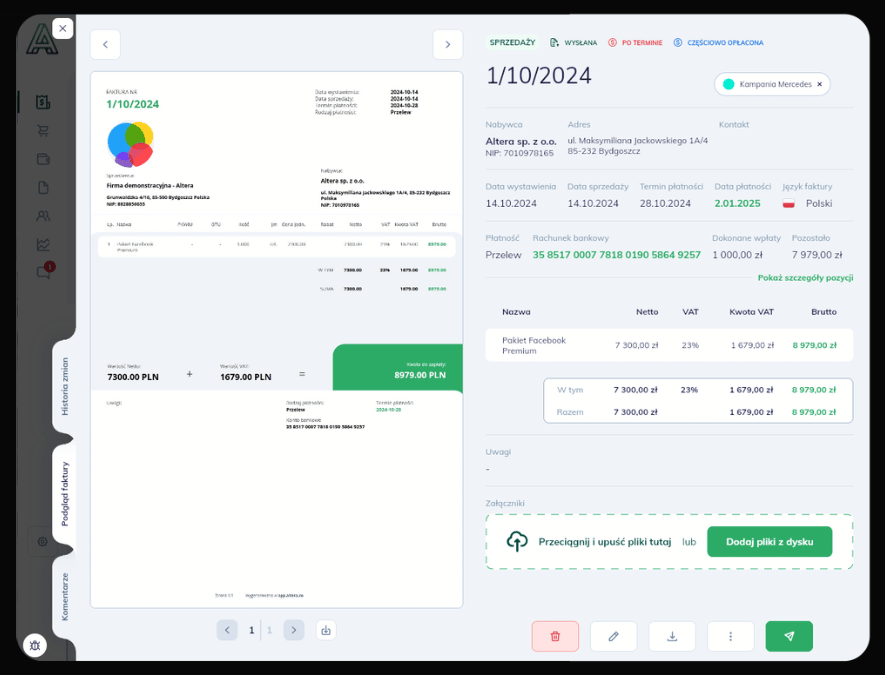
KSeF is built into the Altera.app workflow, without adding extra tools or more manual steps.
Altera.app supports daily invoice work: statuses, confirmations, KSeF numbers and communication history stay available in one system.
- Sending without manual checking
- Costs return to the workflow
- UPO and KSeF number on the document
The invoice is only the beginning of the process.
With KSeF, issuing a document is not enough. The team still needs to know whether it was sent, whether UPO returned, who can see the cost and where the document goes next.
Sending without manual checking
An invoice can go to KSeF immediately or at the end of the day, and the team sees the status without opening the government portal.
Costs return to the workflow
Invoices from contractors are retrieved from KSeF into the cost workflow instead of living in a separate place.
UPO and KSeF number on the document
Confirmations, statuses and communication history stay where the team works with the invoice.
Access under control
Accounting, finance and the team see only what their role should expose.
KSeF has concrete dates. Your company needs a concrete process.
This is not only about remembering the timeline. Sales, costs, confirmations and document workflow need to work predictably through every rollout stage.
Largest taxpayers and invoice receiving
The first stage tests whether a company can work with statuses, UPO and costs without manually working around the system.
Most companies in mandatory KSeF
KSeF becomes a daily part of invoicing, not a side project for accounting.
Smallest taxpayers after the transition period
Even at a smaller scale, the process should not depend on one person remembering every step.
KSeF rollout without dragging the project out.
We set up a real operating process, not only a technical connection to the system.
- 01
You grant permissions
We walk through the access scope needed to send and receive invoices. No login or password sharing.
- 02
We configure sending and receiving
We set up sales invoices, cost invoices, statuses, KSeF numbers and UPO handling.
- 03
We test real scenarios
We check invoice issuing, cost retrieval, accounting visibility and the next document workflow step.
- 04
You launch with control
The team knows where to check status, who owns the document and what to do when KSeF returns a message.
KSeF in practice: less portal, more process.
The value is not just the KSeF connection. It is that the invoice immediately enters the team workflow.
Sales without a second track
You issue the invoice in Altera.app, and the system handles KSeF sending, status, KSeF number and UPO.
No need to return to the portal just to see whether the document moved.Costs land where the team works
Cost invoices from KSeF enter the Costs module, where they can be described, approved and linked with payment.
KSeF does not create a separate queue outside the process.Permissions instead of passwords
Access works within the scope you grant. Roles help separate sales, costs and accounting work.
Less risk, more predictability.Confirmations without email hunting
KSeF number, UPO, document status and communication history sit next to the invoice, not in notes, email or separate files.
The proof of process is where the document is.You do not give us a password. You give us a job to do.
Connecting KSeF does not mean sharing your login or password. You grant permissions within a defined scope, and Altera works technically within that scope.
- You grant permissions
- Altera works within a defined scope
- You can revoke permissions
- You do not share login or password
For service companies where an invoice does not end the topic.
An invoice can be issued in a minute. Then comes the rest: KSeF, costs, approvals, payments, statuses and the question whether everything is under control.
For owners
You see the process instead of asking every day whether invoices were sent, costs were retrieved and nothing was missed.
For finance teams
Invoices, costs, UPO, statuses and document workflow stay in one place. Less clicking around. More control.
For accounting
Documents, statuses and confirmations are available in one process, not scattered across inboxes and files.
For teams
Less manual checking of deadlines, statuses and questions about where a document is now.
KSeF plus electronic document workflow.
Sending an invoice alone is not enough. The company still needs to know who approves a cost, whether a contractor is trusted, whether a document is paid and where the UPO is.
See how workflow worksWho should approve the cost?
The invoice enters the process, not a random inbox.
Is the contractor trusted?
Altera helps verify what should really move forward.
Is the document paid?
Payment status and document context stay close together.
Is there UPO?
Confirmations live in the system, not in five places at once.
See KSeF in practice. Not on slides.
In the demo we will show the process from connecting a company to KSeF to statuses and document workflow.
- Connecting the company to KSeF
- Issuing an invoice
- Sending to KSeF
- KSeF number and UPO
- Retrieving costs
- Statuses and document workflow
Common questions about KSeF in Altera.app
Everything that is better explained before rollout, not after the first stressful phone call.
How long does connecting KSeF take?
The technical KSeF connection in Altera.app takes about 2 minutes. In the demo, we show that step and what happens next: sending invoices, receiving costs, statuses, UPO confirmations, and document workflow.
Do I need to change how I issue invoices today?
You do not need to turn the process upside down. You issue invoices in Altera.app, and the system can send them to KSeF immediately or automatically at the end of the day.
Can accounting also have access?
Yes. You can grant access to people who work with documents in your company so accounting, finance and the team can use the same process.
Can I first see a demo on sample data?
Yes. During the demo we can show the process on sample data so you can see invoice issuing, KSeF sending, cost retrieval, statuses and UPO in practice.
Does Altera replace accounting software?
No. Altera does not replace accounting software. It organizes company workflows, document flow, invoices, costs, payments and data handoff to accounting, but it does not post accounting entries or file tax declarations with tax authorities.
What happens if KSeF is unavailable?
This is worth discussing in a demo in the context of your process. We will show how Altera.app helps control document statuses and what should be planned for such a scenario.
Is this for a microbusiness with a few invoices per month?
Altera.app works best where invoices, costs, approvals and payments start to form a process, not a single action. If you have only a few invoices per month, we will show whether rollout makes sense.
Do I need to share my KSeF login or password?
No. Altera.app does not need your KSeF login or password. You grant only a specific scope of permissions.
How do I grant KSeF access?
You grant access through one-time access authorization or by separately granting permissions in the KSeF Entrepreneur Application. You do not share your KSeF login or password.
Can I revoke permissions?
Yes. You can revoke permissions in the KSeF portal at any time.
Does Altera send sales invoices automatically?
Yes. You can send an invoice immediately or leave it for automatic end-of-day sending.
Does Altera retrieve cost invoices from KSeF?
Yes. After integration is launched, cost invoices can appear in the Costs module.
What about invoices from unknown contractors?
Altera.app uses a trusted contractor list to help distinguish real suppliers from suspicious sources.
Can an invoice be edited after sending to KSeF?
After sending to KSeF, the invoice becomes read-only. Any changes are handled through corrections.
KSeF is already in the daily company process. The question is whether you control it.
Connect your company to KSeF in Altera.app and see invoicing without manual checking of every step.
- Sales invoice sending
- Cost invoice retrieval
- Statuses and UPO
- Contractor control