Automated Reconciliation
Bank transactions, invoices, and payment statuses connected through Open Banking, automated matching, and bank consent control.
Reconciliation without manually checking the bank
Manually checking whether an invoice was paid stops working once document volume grows. The team compares transfers with invoices, updates statuses, and prepares accounting reports instead of working on automatically connected data.
Altera connects invoices with bank transactions through EasyCheck Open Banking. After the bank account is connected once, the system can retrieve transaction history, support MT940 reports, and match payments with documents.
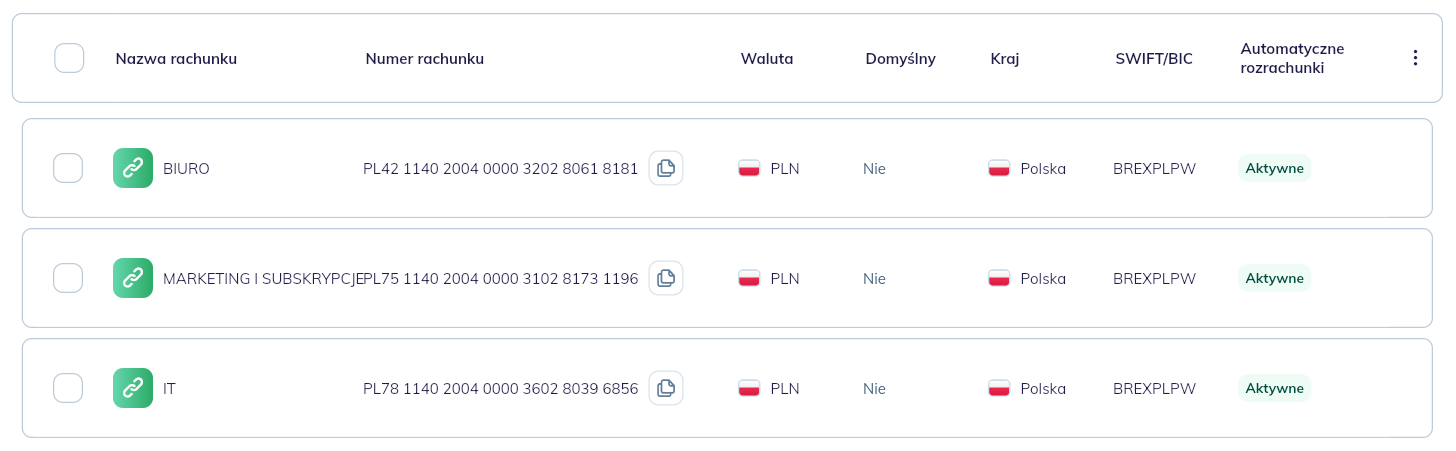
<PHOTO: connected bank accounts list with consent status and expiry date>
Connecting an account through EasyCheck
The user selects a bank in bank account settings, confirms consent in EasyCheck, and returns to Altera. After the first synchronization, the account view shows consent status, expiry date, and manual refresh.
The team can see which accounts sync automatically, which consents need renewal, and when bank data was last retrieved.
Swift Settle
Swift Settle compares bank transactions with invoices and helps mark documents as fully or partially paid. Payment status no longer depends only on someone checking the bank manually.
<PHOTO: bank transaction matched with an invoice and partially paid status>
MT940 and accounting
The bank connection helps prepare data needed for MT940 reports without manually sending statement files from the bank to accounting. This makes cooperation with the accounting office cleaner and reduces repetitive work.
Reconciliation also feeds receivable and payable statuses. Once a payment is matched, downstream Altera processes can use the current document status.
Security and control
EasyCheck access is read-only. Altera does not receive permission to initiate transfers. Consent can be paused or removed in settings, and its validity is time-limited.
This gives automated reconciliation without moving control over money to a system that only needs to read data and help match payments.
Want to see this feature on your workflow?
In a demo, we will walk through your documents, roles, and edge cases to show where automation can help first.