Integrations, API, and Exports
KSeF, Open Banking, accounting exports, and OpenAPI connected to the same invoice, expense, payment, and reconciliation workflow.
Integrations as part of the finance process
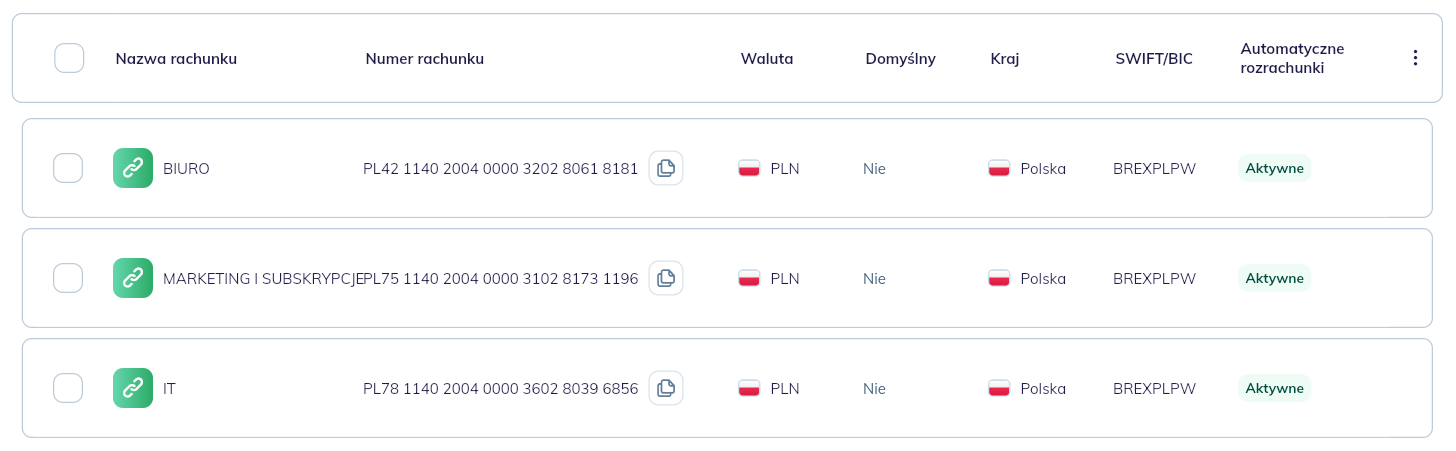
A finance system does not work in isolation. Data needs to move to the bank, accounting, KSeF, external systems, and reports. The problem starts when each connection requires a separate file, manual export, or retyping the same information.
Altera treats integrations as part of the finance process. Documents can enter the system automatically, move through workflow, reconciliation, and controlling, and then leave in the format required by the bank, accounting, or another system.
<PHOTO: company integrations view with KSeF, bank connection, and OpenAPI key>
Exports for accounting
Invoices can be exported as PDF, Excel, JPK_FA, JPK_KSEF, and files for Symfonia FK, enova365, and Comarch Optima. The export can include all documents, a filtered list, or manually selected items.
The team does not have to assemble a separate spreadsheet or retype data into accounting software. The export comes from the same place where documents are handled.
Exports without waiting at the screen
An export can take a moment, but the user does not have to wait. When it is ready, they receive an in-app notification and can download the completed file.
<PHOTO: notification about a completed export with file download action>
OpenAPI
OpenAPI lets external systems work with company data in Altera: contractors, products, projects, sales, and costs. The API key is generated in company settings, and access is assigned to a specific company.
This is useful when the company has its own operational system, online store, CRM, or another tool that should send data into the finance process without manual import.
KSeF and banking in one flow
KSeF supports sending sales invoices and retrieving expense invoices, while Open Banking supplies transactions for reconciliation. The company does not assemble the process from separate tools, but works on one data flow.
The biggest value appears when integrations are not an add-on, but a natural part of document work: from issuing, through workflow, to payment, accounting, and reporting.
See it in the app
Want to see this feature on your workflow?
In a demo, we will walk through your documents, roles, and edge cases to show where automation can help first.