Payment Automation
Transfer batches for approved expense invoices, dates aligned with due dates, and Elixir-0 export without retyping data into the bank.
From approved invoice to ready payment
In many companies, invoice approval and bank transfer preparation still happen in separate places. An invoice goes through approval, someone clears it for payment, and then the team retypes or copies the amount, contractor, account number, transfer title, and execution date into the bank or a spreadsheet.
That creates unnecessary risk. A document can be missed, paid late, paid to the wrong account, or prepared for payment before it should be paid.
Altera connects these steps. An invoice enters payments after it has been approved for payment, is marked as unpaid, and has a Polish bank account. The liabilities list is based on documents that passed the company approval process, not on a manually maintained spreadsheet.
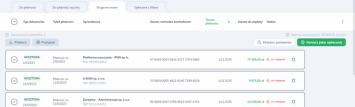
<PHOTO: payments list with invoices approved for payment, amounts, contractors, due dates, and statuses>
A liabilities list the team can control
In the Payments module, users see documents ready to be paid. They can select specific invoices, check payment details, and decide which liabilities should be exported.
This matters when a company pays on a schedule: daily, weekly, or on selected days of the month. Instead of rebuilding the transfer list from scratch, the team works from current Altera data.
<PHOTO: selected invoices on the payments list before transfer batch export>
Payment dates aligned with invoice due dates
Altera automatically sets the payment date according to the due date on the invoice. That makes it easier to avoid accidental late payments or paying documents too early.
The user remains in control. During export, the execution date can be changed when cash flow, payment schedules, or finance decisions require it.
<PHOTO: payment export details with the option to change transfer execution dates>
Bank export without retyping data
After selecting payments, Altera generates a transfer batch in Elixir-0 format, also known as Multicash PLI. The file can be imported into the bank instead of creating each transfer manually.
This reduces mistakes and speeds up work when there are many invoices. Transfer data comes from the documents in the system, so the team does not copy amounts, bank accounts, and titles between applications.
<PHOTO: screen for generating or downloading an Elixir-0 / Multicash PLI transfer batch>
Account check before payment
Before making a transfer, the contractor bank account can be checked manually against the Polish VAT whitelist. This adds a control point before funds are sent and is an important safety step for expense invoice payments.
In practice, it helps confirm that the account used for payment is correct before the transfer batch reaches the bank.
<PHOTO: payment details with an action to verify the contractor account against the VAT whitelist>
Payments outside expense invoices
Not every company payment comes directly from an expense invoice. Salaries, taxes, social insurance, and other liabilities may come from separate processes.
Those payments can be added to Altera through an Excel import, so they can be prepared together with other transfers and stay within one organized bank export process.
<PHOTO: import of additional payments from an Excel file>
Payment status returns to the process
After a transfer batch is prepared, the company still needs to know what was actually paid. Payment status can be updated through reconciliation, Open Banking, or manual marking by the user.
Altera does not stop at file export. Payment information returns to the finance process and can be visible on the invoice, in reconciliation, and in reports.
Value for the finance team
Payment automation helps most when a company has many expense invoices, several people approving documents, and regular payment windows. The team does not have to recreate liability lists, track due dates in a spreadsheet, or retype transfer data into the bank.
The result is less operational work, lower error risk, and better control over which invoices are approved, ready to pay, and actually paid.
See it in the app
Want to see this feature on your workflow?
In a demo, we will walk through your documents, roles, and edge cases to show where automation can help first.